
Desk setup2 August 20266 min read
Desk Mat and Mousepad Sizes in Pakistan: M, L, XL, and XXL Compared
Compare desk mat and large mousepad sizes, prices, and setup recommendations before choosing M, L, XL, or XXL in Pakistan.
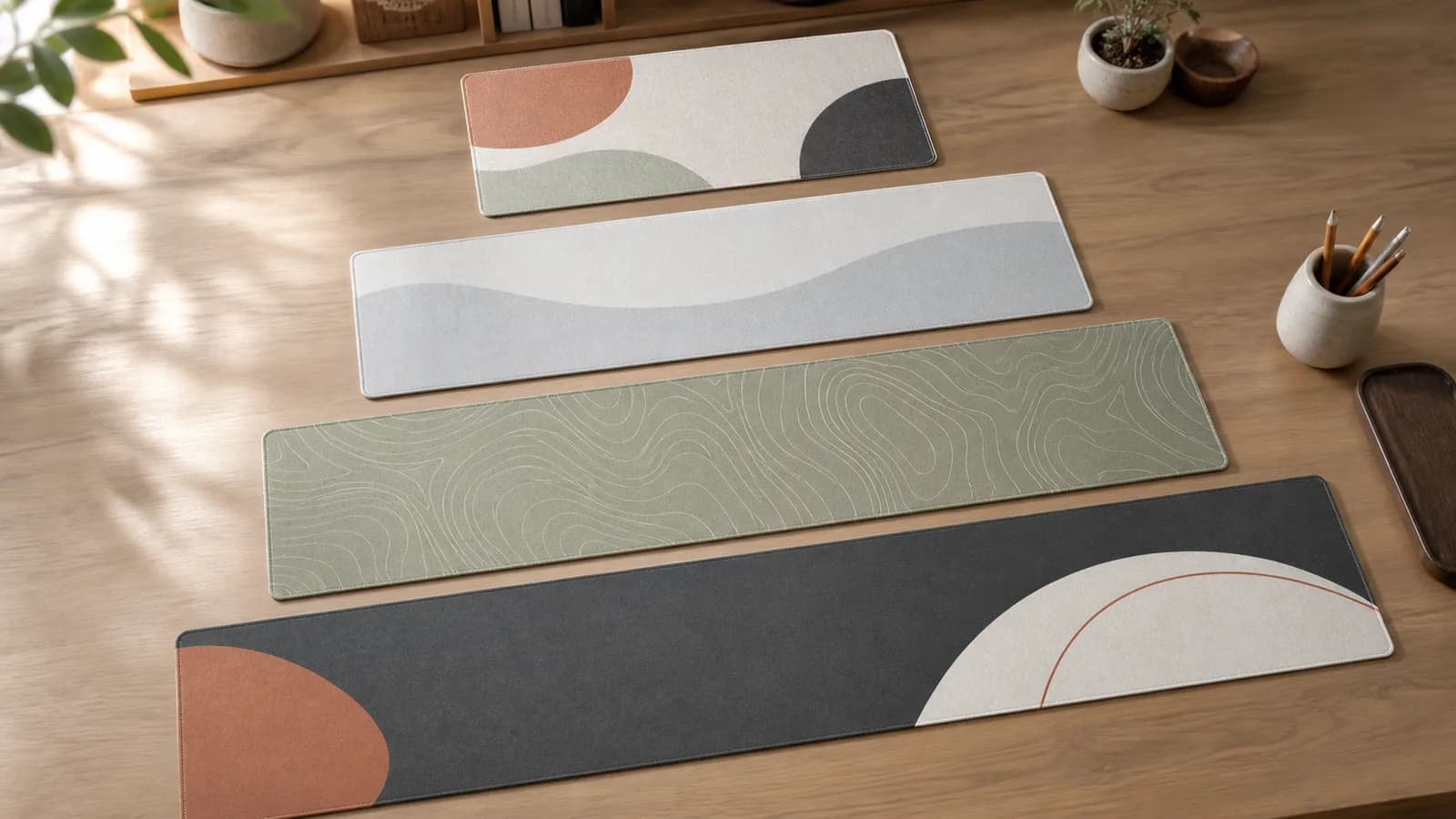
If you are buying a desk mat in Pakistan, size matters more than the design at first. The right mat should fit your actual desk, leave enough space for keyboard and mouse movement, and still look intentional in your room or gaming setup.
This guide compares the four Lasting Details desk mat sizes: M, L, XL, and XXL. It is written for study desks, work-from-home setups, gaming desks, and custom printed desk mats where the artwork needs to look balanced.
Shop desk mats or create a custom desk mat after comparing the sizes below.
Is a desk mat the same as a mousepad?
Yes. A desk mat is a large mousepad. The same printed surface that your mouse tracks on also sits under the keyboard, so the only real decision is how much of the desk you want covered. At Lasting Details every design is one product in four sizes, so there is no separate gaming mousepad range to compare against.
Names differ by habit more than by product. Smaller sizes are usually called a mousepad or mouse pad, wider ones a desk mat, desk pad, or extended gaming mousepad. All four sizes below share the same micro-textured cloth surface, non-slip rubber base, and stitched edge.
Quick desk mat size and price comparison
| Size | Dimensions | Best for | Price |
|---|---|---|---|
| M | 450 x 400 mm / 17.5 x 15.5 in | Compact desks, laptops, and small study corners | PKR 2,299 |
| L | 700 x 300 mm / 27.5 x 11.8 in | Daily work desks and narrow tables | PKR 2,799 |
| XL | 800 x 400 mm / 31.5 x 15.7 in | Most keyboard and mouse setups | PKR 3,399 |
| XXL | 900 x 400 mm / 35.4 x 15.7 in | Gaming desks and full-width setup styling | PKR 3,599 |
How to choose the right desk mat size
Measure the usable area of your desk before choosing a size. Do not measure the full table if part of it is taken by a monitor stand, speakers, books, or a laptop riser. For a clean look, leave breathing room at the left and right edges instead of forcing the mat to touch every side.
For most Pakistani study and work desks, depth is the deciding factor. A 300 mm deep mat is easier on narrow desks. A 400 mm deep mat feels more premium and gives more vertical mouse movement, but it needs enough front-to-back desk space.
M desk mat: 450 x 400 mm
The M size is best if you want a generous mousepad, not a full desk cover. It works well for laptop users, compact study tables, hostel rooms, side desks, and people who keep notebooks or books beside the mat.
Choose M if your desk is narrow, if you use a laptop most of the time, or if you want the mat to sit beside your keyboard rather than under everything.
L desk mat: 700 x 300 mm
The L size is the safest choice for many daily desks because it fits a keyboard and mouse without requiring a very deep table. The 700 mm width gives the setup a connected look, while the 300 mm depth leaves room for notebooks, mugs, or desk accessories.
Choose L for study desks, office desks, and clean work-from-home setups where you want comfort without covering the whole surface.
XL desk mat: 800 x 400 mm
XL is the best overall size for most people. It gives enough width for a keyboard and mouse, enough depth for comfortable movement, and enough visual presence for printed artwork to look premium.
If you are unsure, start with XL. It suits full-size keyboards, compact keyboards, productivity setups, light gaming, and most modern desk styles.
XXL desk mat: 900 x 400 mm
XXL is the best choice for gaming setups, wide desks, and users who want the desk mat to become the visual base of the whole setup. It gives more horizontal room for low-sensitivity mouse movement and makes a printed design feel more like a feature piece.
Choose XXL if your desk is wide enough, if you use a full-size keyboard, or if you want the keyboard, mouse, and accessories to sit on one continuous surface.
Gaming, work, and study recommendations
- Best for compact study desks: M, especially beside a laptop or small keyboard.
- Best for everyday work: L, because it fits common desks without feeling oversized.
- Best overall: XL, because it balances comfort, artwork visibility, and desk coverage.
- Best for gaming: XXL, especially for full keyboards and wide mouse movement.
Which mousepad size is best for gaming?
For gaming, the question is how far the mouse travels rather than how wide the desk is. Low-sensitivity players sweep the whole forearm across the pad, so the mat has to hold a full-size keyboard and still leave clear tracking space to its right.
- Low sensitivity, full-size keyboard: XXL at 900 x 400 mm leaves the most uninterrupted mouse area beside the keys.
- Low sensitivity, tenkeyless or 60% keyboard: XL at 800 x 400 mm is usually enough, and it suits desks under 120 cm.
- Higher sensitivity or mouse-only use: M at 450 x 400 mm works as a standard gaming mousepad beside a laptop.
- Narrow desks: L at 700 x 300 mm covers the width but gives less vertical room for large sweeps.
Measure your usable desk depth before choosing XL or XXL. Both are 400 mm deep, so a desk shallower than 45 cm leaves little room behind the mat for a monitor stand.
What size artwork works best for custom desk mats?
For custom desk mats, use wide landscape artwork whenever possible. A design that looks good as a phone wallpaper may not automatically work on a 700 mm or 900 mm wide mat. Keep names, logos, faces, and important text away from the edges because stitched borders and trimming need a small safety area.
Abstract patterns, gaming artwork, typography, brand logos, university society designs, and soft illustrated scenes usually work well. If your file is not suitable, our studio checks it before production and can tell you what needs adjustment. For file-prep detail, use the custom desk mat artwork guide.
Can you wash a desk mat?
Yes, but clean it gently. Use a soft damp cloth for everyday dust and marks. For deeper cleaning, use cold water with a small amount of mild soap, wipe gently, then air dry the mat flat. Do not use bleach, harsh detergents, ironing, direct heat, or a hair dryer.
For more detail, read our printed desk mat care guide.
Final recommendation
If you want one simple answer, choose XL for the best all-round desk mat. Choose XXL if your desk is wide and you want a stronger gaming or full-setup look. Choose L for narrower work desks, and choose M for compact laptop or study spaces.
Studio note: measure around monitor stands and permanent accessories, not just the outside edge of the desk. The usable depth is often the measurement that rules out a size.
Ready to choose? Browse desk mat designs, use our guide to match a desk mat design to your setup, or upload your own artwork with the custom desk mat builder.
Next step
Turn the guide into a finished piece.
Use the guide to pick a ready design, or send your own artwork for studio review before production.